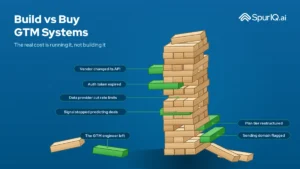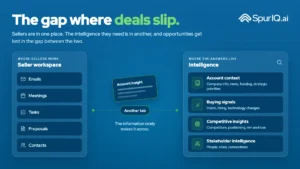
Ask a revenue team how they actually launch a campaign, and you’ll hear a version of the same story. Someone pulls a list from one tool. Someone else enriches it in another. A rep researches the accounts. Somebody writes the copy. It gets loaded into a sequencer, cross-checked against the CRM, and, two days later, it goes out. Multiply that by every play a growing team wants to run, and you understand why most of them run so few.
So here’s the question we kept asking: what if you could just say what you want?
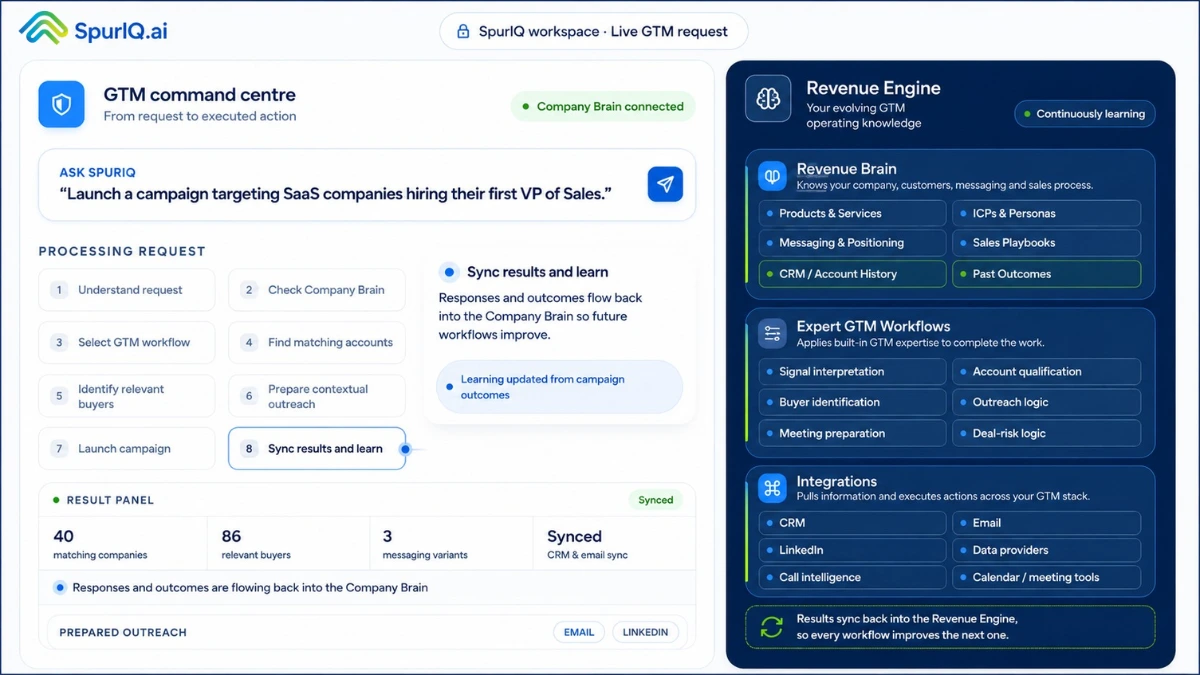
That’s the idea behind SpurIQ’s GTM command centre. One place to work from. You type a request in plain English, and SpurIQ turns it into a complete, running campaign, grounded in how your company actually sells. No configuring across seven tabs, no two-day build.
This is where the Revenue Brain stops being a concept and starts doing something. Let me show you exactly what happens when a request goes in, step by step, because seeing the flow is worth more than any description.
How SpurIQ’s Revenue engine (GTM command centre) works?
Let’s start with an example of a running campaign targeting SaaS companies looking to hire VP of Sales.
You don’t fill in a brief. You just tell it what you want, the way you’d tell a sharp new hire:
| “Launch a campaign targeting SaaS companies hiring their first VP of Sales.” |
From that one sentence, SpurIQ builds and runs a complete, company-specific workflow, across eight steps. Here’s what’s actually happening under each one.
One sentence. From there, SpurIQ turns that request into a complete, company-specific GTM workflow, and runs it through eight steps. Here’s what’s actually happening under each one.
Step 1: Understand the request
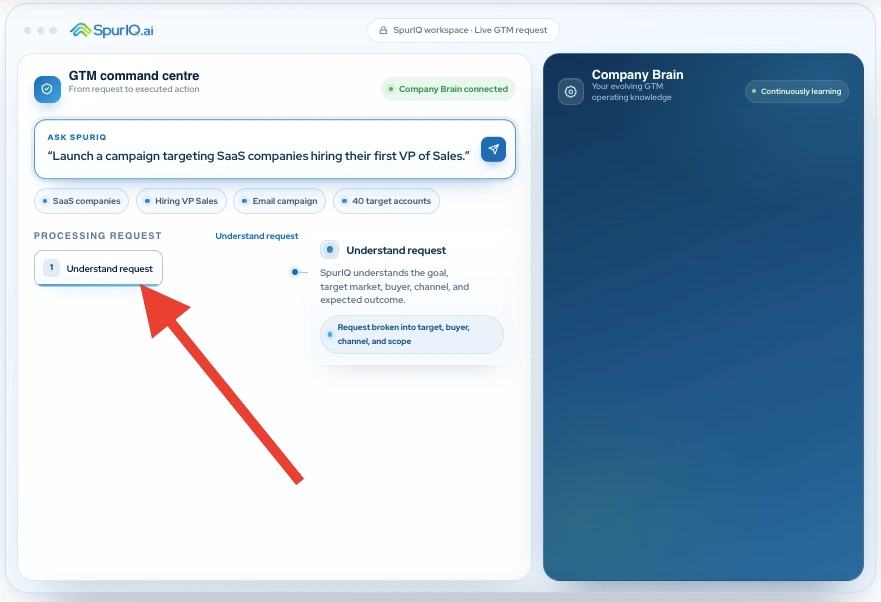
SpurIQ reads the goal and breaks it into its real parts: the target market (SaaS), the trigger (hiring a first VP of Sales), the channel (email), and the scope (a campaign). Before anything moves, it knows what you’re actually asking for, the target, the buyer, the channel, and the outcome you expect.
Step 2: Check the Revenue Brain
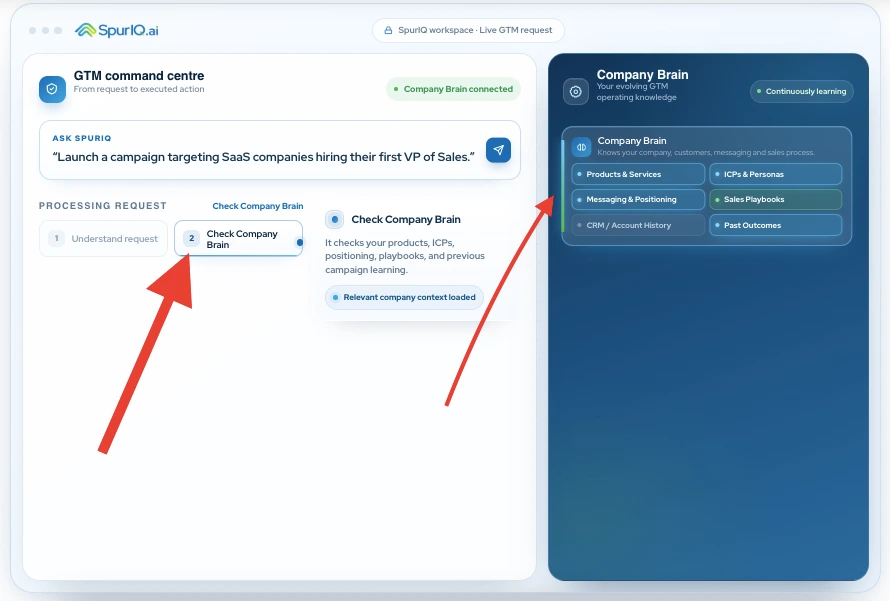
This is the step that makes everything after it specific instead of generic. SpurIQ grounds the request against your Revenue Brain; your ICP definitions, your messaging and positioning, your proof points, your playbooks, and your CRM and account history.
It’s not asking “who hires VPs of Sales?” in the abstract. It’s asking “who matches how we win, given everything we already know?”
Step 3: Select the GTM workflow
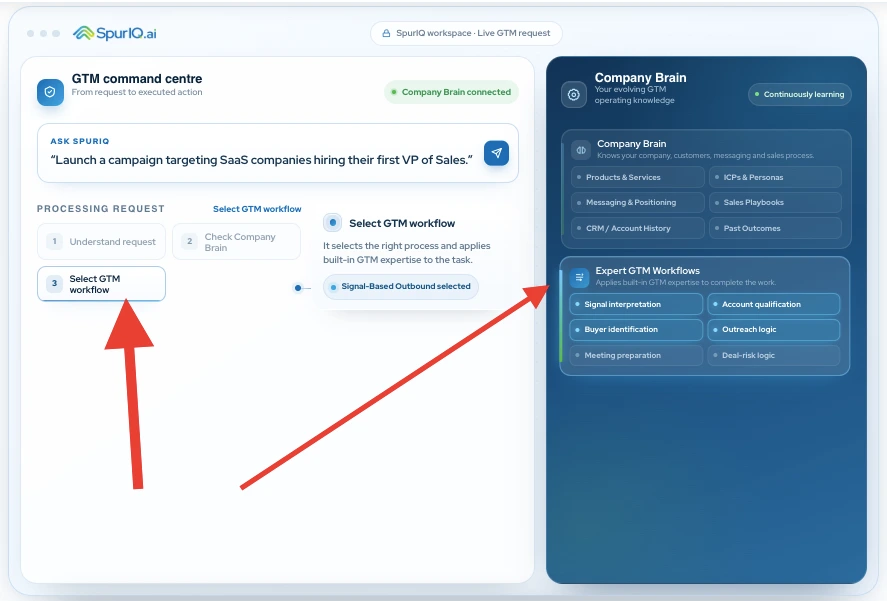
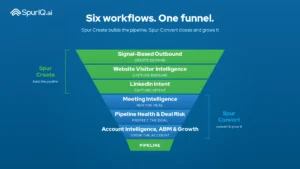
A hiring-signal campaign isn’t the same play as a website-visitor follow-up or a stalled-deal rescue. SpurIQ picks the right workflow for the job; here, Signal-Based Outbound workflow, so the request runs through a proven motion, not an improvised one.
Step 4: Find matching accounts
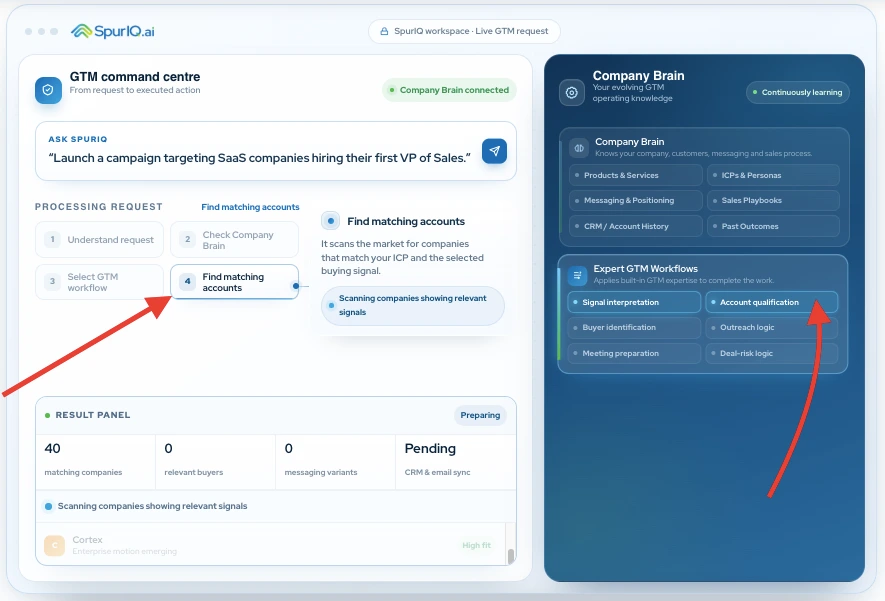
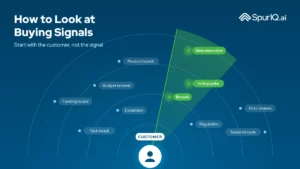
Now the skills go to work. SpurIQ scores fit against your ICP and reads live signals, pulling from your data providers to find SaaS companies actually hiring their first VP of Sales right now. Not a static list you bought six months ago. Companies showing the trigger today.
Step 5: Identify the relevant buyers
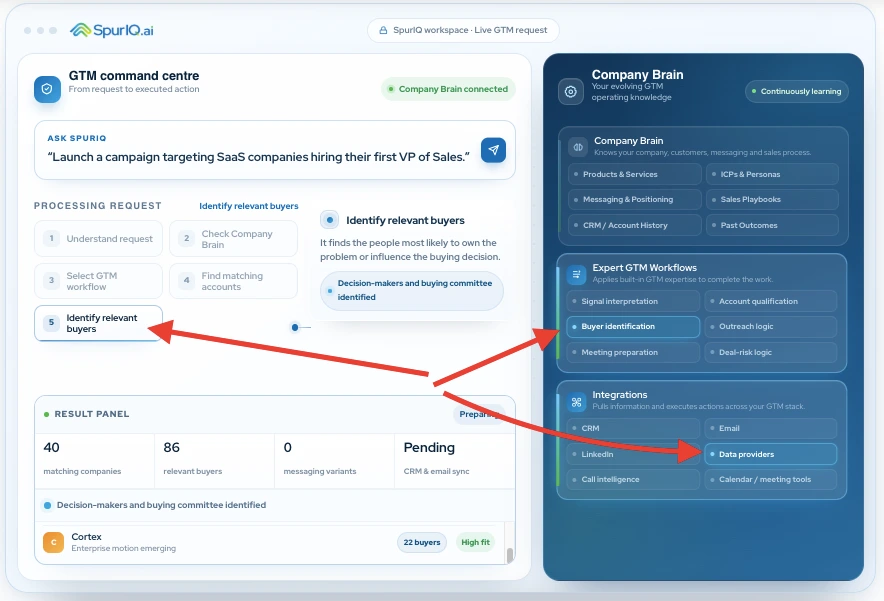
A matched company isn’t a matched person. SpurIQ identifies the specific buyers inside each account who matter for this play, and tags each account by how well it fits and how many relevant buyers sit inside it, so the team knows where to spend attention first.
Step 6: Prepare contextual outreach
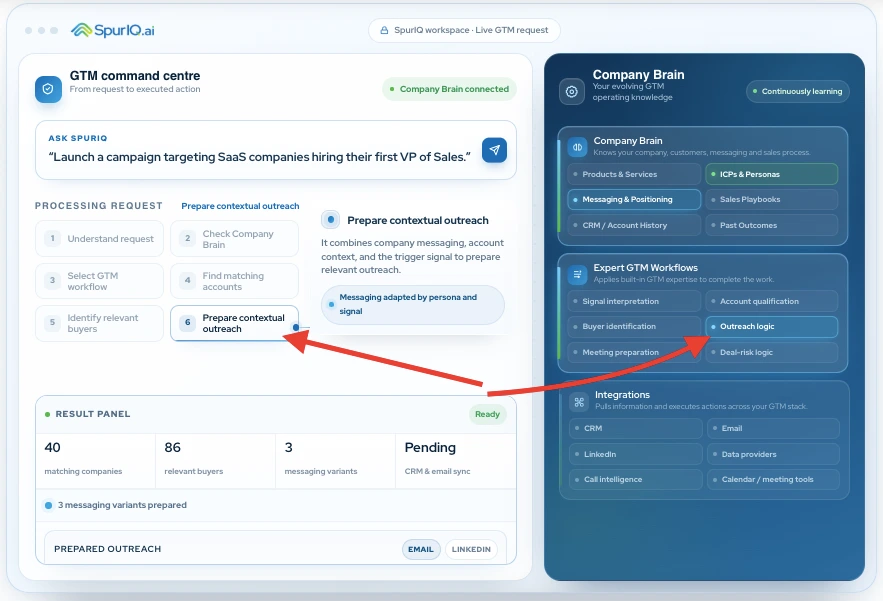
This is where your Revenue Brain earns its keep. SpurIQ combines your positioning, the account’s context, and the trigger signal to draft outreach that sounds like you, not a template. A subject line like “Hiring your first VP Sales often creates follow-up gaps” isn’t generic; it’s your point of view, aimed at a real moment in that buyer’s world. It even prepares a few messaging variants so you’re not betting everything on one angle.
Step 7: Launch the campaign
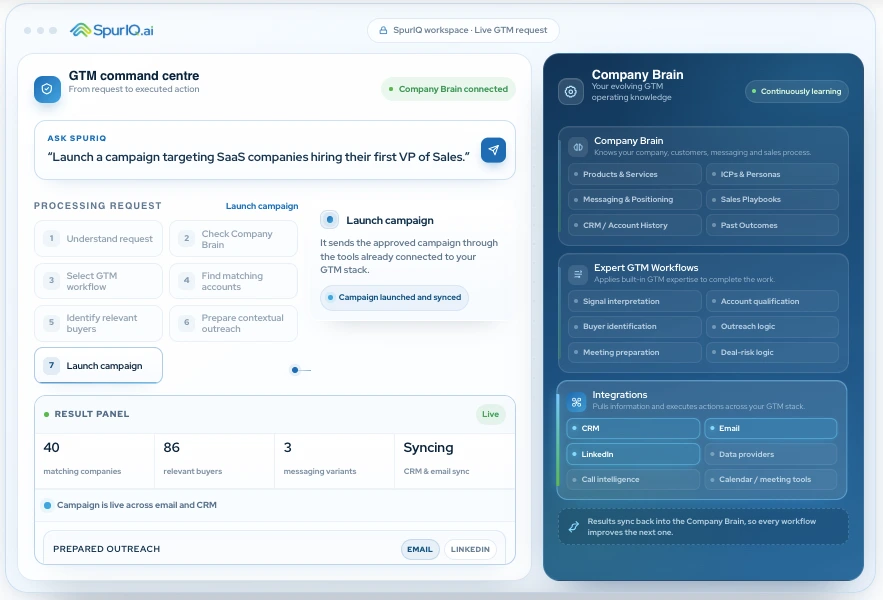
With the accounts, buyers, and messaging ready, SpurIQ launches, executing across the tools you already use (your email platform, LinkedIn, your CRM). Nothing gets re-keyed by hand into a separate system.
Step 8: Sync results and learn
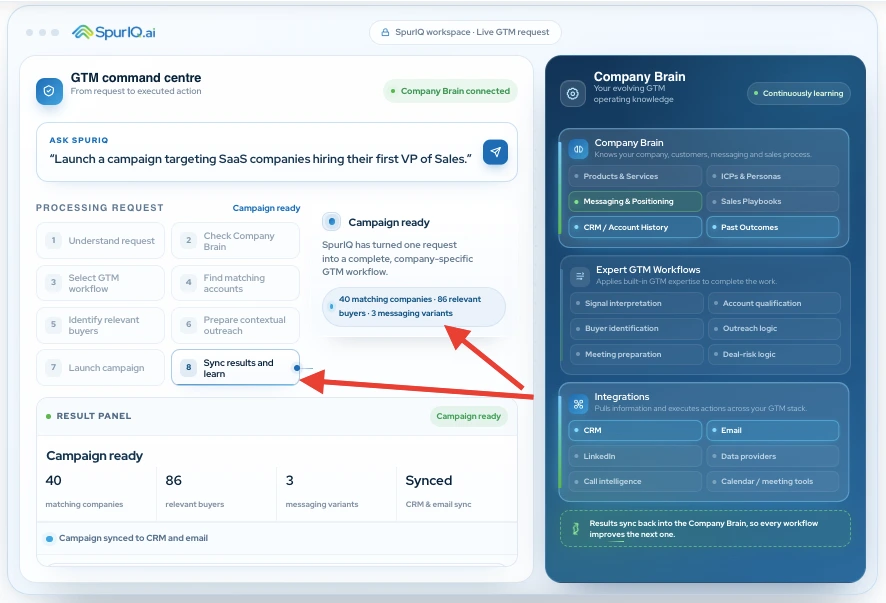
Every result, who opened, who replied, what converted, syncs straight back into your CRM and, crucially, back into the Revenue Brain. The brain doesn’t just execute the campaign. It gets smarter from it, so the next one starts from a better place.
And the output of that one sentence? A campaign that’s ready to go:
| 40 matching companies | 86 relevant buyers | 3 messaging variants | Synced CRM & email |
Forty high-fit SaaS accounts showing the exact trigger. Eighty-six relevant buyers inside them. Three messaging variants written in your voice. All of it synced to your CRM and email. From one sentence, in the time it takes to read this paragraph, not the two days it would take a rep to build that list, research the buyers, write the copy, and log it all by hand.
Same Revenue Engine, different job
Notice which leak that just closed: it was a create-side play, building new pipeline. But the command centre isn’t a one-trick demo. Ask it something else and the same eight-step logic runs a different motion entirely:
- “Prep me for tomorrow’s calls.” → pulls context on every meeting and hands each rep a brief.
- “Which open deals have gone quiet?” → scans the pipeline for stalling, single-threading, and fading engagement.
- “Find expansion in my top accounts.” → surfaces upsell and renewal signals across the base you already have.
Same brain, different job. Creating pipeline and converting it are two halves of one motion, and a single memory runs both. That’s the difference between a tool that helps you work and a brain that does the work.
“Isn’t this just a chatbot with a CRM?”
Fair question, and no. A chatbot generates text and hands it to you. What you just watched is different in four ways that matter:
- It runs a real workflow, not an improvisation. Behind the plain-English request is a proven GTM motion, Signal-Based Outbound, in this case, executed end to end, the same disciplined way every time. It isn’t winging it.
- It’s grounded in your Revenue Brain, not the open internet. Every decision is made against how your company sells, your ICP, your proof, your positioning. The output is yours, not a generic best-guess.
- It actually executes. It doesn’t hand you a draft to copy-paste at 5pm. It launches across your real stack, email, LinkedIn, CRM, and logs everything as it goes.
- It learns. Every result feeds back into the Revenue Brain, so the next request starts smarter. A chatbot forgets the moment you close the tab.
Put simply: a chatbot answers. The command centre acts, and gets better at it every time.
What’s actually powering it?
Behind that single interface, three things are working together. It’s worth understanding, because it’s exactly why the output is specific to you and not generic AI slop.
1. The Revenue Brain: It knows how you sell
Your evolving, continuously-learning memory of the business: what you sell, who’s a fit, your messaging, your playbooks, your account history, and what’s converted before. This is what makes every step yours.
| What it remembers | What that means in practice |
|---|---|
| Products & Services | What you actually sell, and the use cases that land |
| ICPs & Personas | Who’s a fit, by segment, firmographics and persona |
| Messaging & Positioning | Your value props by segment, and your tone of voice |
| Sales Playbooks | The plays that work, codified so they run consistently |
| CRM / Account History | Your accounts, your live pipeline, what’s happened before |
| Past Outcomes | What’s converted, so the brain keeps getting sharper |
2. Expert GTM workflows: they do the work
A brain that only remembers is a filing cabinet. This layer is the built-in GTM expertise that turns memory into completed work: signal interpretation, account qualification, buyer identification, outreach logic, meeting preparation, deal-risk logic. It’s the difference between knowing something and doing something about it.
3. Integrations: they pull information in and push actions out
The Revenue Brain doesn’t live in a walled garden. It reads from, and executes across, the stack your team already uses, CRM, email, LinkedIn, data providers, call intelligence, calendar. No rip-and-replace. Your team keeps working where they already work; the engine works underneath them.
| And here’s the loop that ties it together, printed right on the interface: results sync back into the Revenue Brain, so every workflow improves the next one. |
If you want the full architecture beneath this, the four systems that make it run, and how context, skills, orchestration and execution fit together, that’s the 4-Layer GTM Stack. This piece is the command centre you drive; that one is the machine under the hood.
From configuring tools to directing a system
For years, running go-to-market meant operating a stack, stitching tools together by hand, every single play. The command centre flips that. You stop configuring and start directing: you say what you want, and a system that already knows how your company sells goes and does it, then gets smarter for next time.
One sentence in. A running, company-specific campaign out. That’s what happens when the Revenue Brain has an engine around it.
Want to watch it run on your motion? Book a walkthrough and we’ll turn one of your real requests into a ready campaign, live, in about 10 minutes.
Frequently asked questions:
Q. What is a GTM command centre?
It’s one interface where you run your whole go-to-market motion by describing what you want in plain English. Instead of stitching a campaign across list-building, enrichment, copywriting, sequencing and CRM tools, you make a request and SpurIQ turns it into a complete, running workflow grounded in how your company sells.
Q. Do I need to write prompts or learn a query language?
No. You describe the outcome the way you’d brief a new hire, “launch a campaign targeting SaaS companies hiring their first VP of Sales.” SpurIQ handles the interpretation, the targeting, the copy, and the execution.
Q. How is this different from ChatGPT or an AI writing tool?
Those generate text and hand it to you. The command centre runs a proven GTM workflow end to end, grounded in your Revenue Brain rather than the open internet, and actually executes across your real stack, then learns from the results. It acts; a chatbot answers.
Q. Does it actually launch the campaign, or just draft it?
It launches. Once the accounts, buyers and messaging are ready, it executes across the tools you already use, email, LinkedIn, CRM and syncs every result back automatically. You review and approve; you don’t re-key anything by hand.
Q. What kinds of requests can I make?
Both create-side and convert-side plays. Build a signal-based outbound campaign, follow up on website visitors, prep for tomorrow’s calls, flag deals going quiet, or surface expansion in your accounts. Same command centre, same brain, different motion each time.
Q. Do I have to replace my existing tools?
No. It works across the CRM, email, LinkedIn, data and calendar tools you already use, reading from them and pushing actions back out. No data migration, no rip-and-replace; most teams are live in about two weeks.